
Windows Log Management Features
Everything you need for centralized Windows event logging — in one flat rate package
EventGuard is the Windows log management tool IT teams have been waiting for. Deploy in under 30 minutes, collect unlimited Windows event logs, and search across all your data instantly. With flat rate pricing and NIST compliant security, EventGuard replaces expensive SIEMs like Splunk. Read our detailed comparisons to see why companies are switching, or contact our team for a personalized demo.
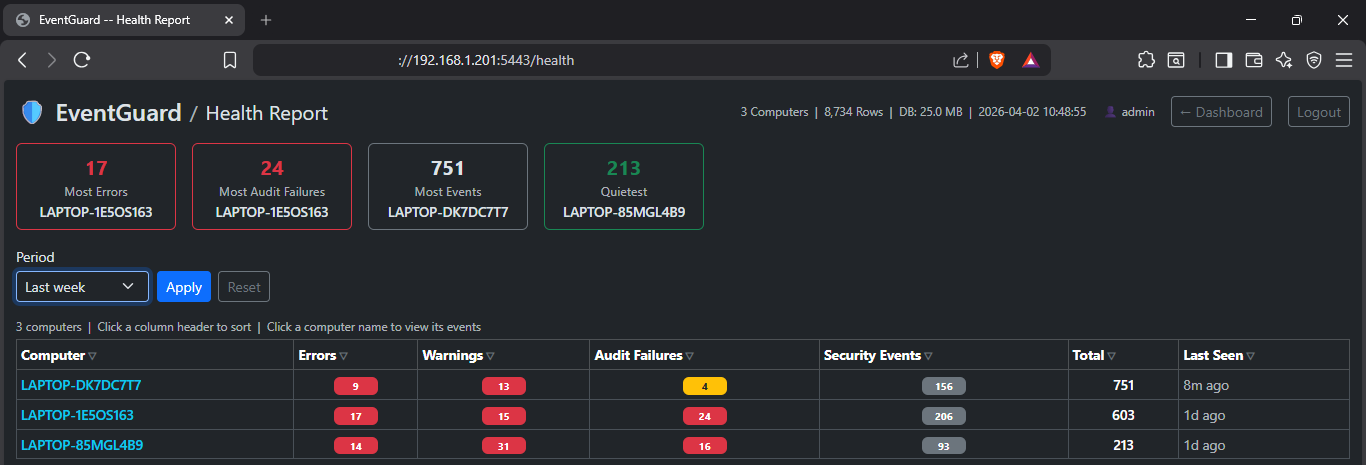
📊 Dashboard Features
Centralized command center for all your Windows event logs
Centralized Windows Event Management
EventGuard brings all your Windows event logs into one powerful, intuitive dashboard. No more jumping between servers or wrestling with complex query languages.
- ✓ Real-time event collection from unlimited Windows servers
- ✓ Search millions of events in under a second
- ✓ Filter by event ID, source, user, time range, or keyword
- ✓ Export results for audit or compliance reporting
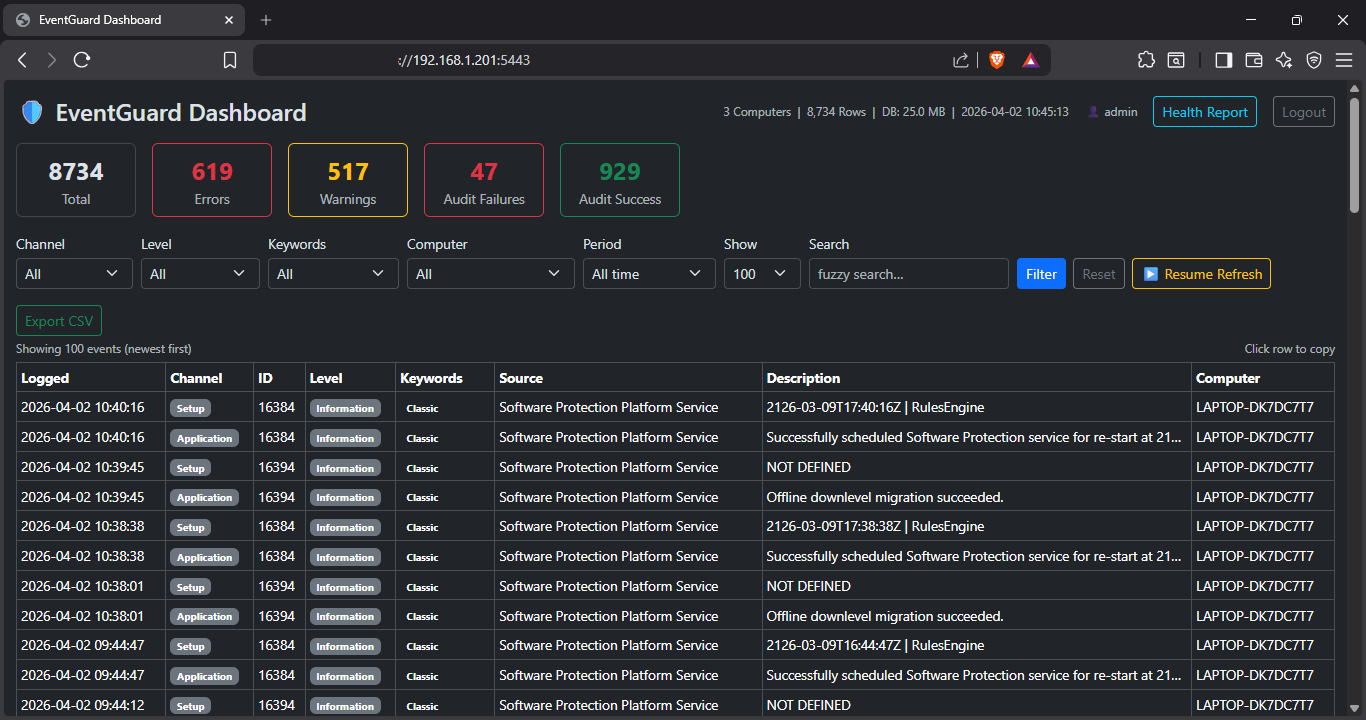
Combine filters to zero in on exactly what you need
Filter by channel, severity level, keywords, time period, and number of results. Combine multiple filters to pinpoint specific events.
- ✓ Filter by event ID, source, or computer name
- ✓ Time-based filtering with relative or absolute ranges
- ✓ Keyword search with highlighting
- ✓ Save and reuse complex filter combinations
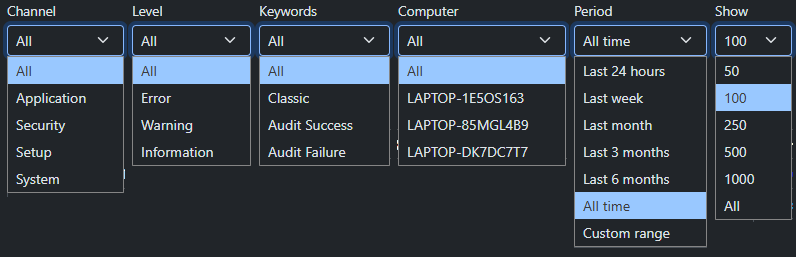
Which machines are causing the most errors and warnings?
Be proactive and cleanup problem machines with our Health report. Per-computer summary of errors, warnings, audit failures, and security events.
- ✓ Highlight cards for worst and quietest machines
- ✓ Sortable columns for easy prioritization
- ✓ Relative last-seen timestamps
- ✓ One click to drill into any single machine's events
🖥️ Agent Features
📡 How Agents Feed the Database
Windows Agents
~11MB memory
Collect Event Logs
HTTPS (TLS 1.2+)
Encrypted transmission
Port 5443
PostgreSQL Database
Unlimited size
13-month retention
🛡️ No data loss: If the Dashboard is unreachable, events save to local SQLite fallback. Auto-drain when connection restores.
Simple Deployment
MSI installer. Deploy via GPO, SCCM, Intune, or manual install. No Python, no containers, no cloud dependencies.
Low Resource Footprint
~11MB memory per agent. Minimal CPU impact — designed for production servers with thousands of agents.
Unlimited Agents
No per-agent licensing fees. Deploy on 10 or 10,000+ Windows servers at no additional cost.
Auto-Update
Agents check for updates automatically. Optional manual control for air-gapped environments.
Secure Communication
All agent-to-dashboard traffic encrypted with HTTPS (TLS 1.2/1.3). No database credentials stored on agents.
Local Fallback Database
SQLite cache if central DB unreachable. Events replay automatically. 7-day auto-purge prevents disk bloat.
🔇 Agent-Level Noise Filtering — Three Tiers
All filtering happens before events leave the monitored machine — reducing database growth, network traffic, and dashboard clutter
| Tier | Mechanism | What it does |
|---|---|---|
| Tier 1 — Whitelist | NIST SP 800-92 protected event IDs | Security-critical event IDs bypass the dynamic filter entirely — even during burst conditions. |
| Tier 2 — Static blacklist | Always-drop exclusions | High-volume, zero-security-value events dropped unconditionally — WFP traffic, Kerberos success noise, service state changes. |
| Tier 3 — Dynamic filter | Learned per-machine patterns | Tracks frequency of each event pattern; suppresses repetitive noise automatically. Suppression always expires — nothing is permanently silenced. |
🔒 Security & Compliance
Enterprise-grade security that meets NIST SP 800-53 standards
Encryption in Transit
HTTPS (TLS 1.2/1.3) between all components — browser, dashboard, and agents.
Encryption at Rest
Windows DPAPI with AES-256 encryption for logs and credentials.
API Key Authentication
No database credentials stored on agents. Revocable API keys for secure communication.
Active Directory / LDAP
Full LDAP authentication with security group-based access control.
Role-Based Access Control
Granular permissions: Viewer, Analyst, Admin, Auditor.
Zero Vendor Backdoor
No phoning home, no telemetry, no cloud dependency. Your logs stay on your infrastructure.
📋 System Requirements
Minimal requirements — runs on any Windows Server or workstation
Operating System
Windows 10, Windows 11, Windows Server 2016+
Dashboard Memory
10-50 MB
Agent Memory
~11 MB
Browser
Chrome, Edge, Firefox
Database
PostgreSQL (free, open source)
Firewall
TCP port 5443 for HTTPS
log management features
Ready to transform your Windows log management?
Join IT teams that saved 70-90% with EventGuard's flat rate licensing.
Start 14-Day Trial →