
Log Management Solution: Predictable Pricing and Fast Search Performance
See why EventGuard belongs in your stack without the surprise high fees or bloatware.
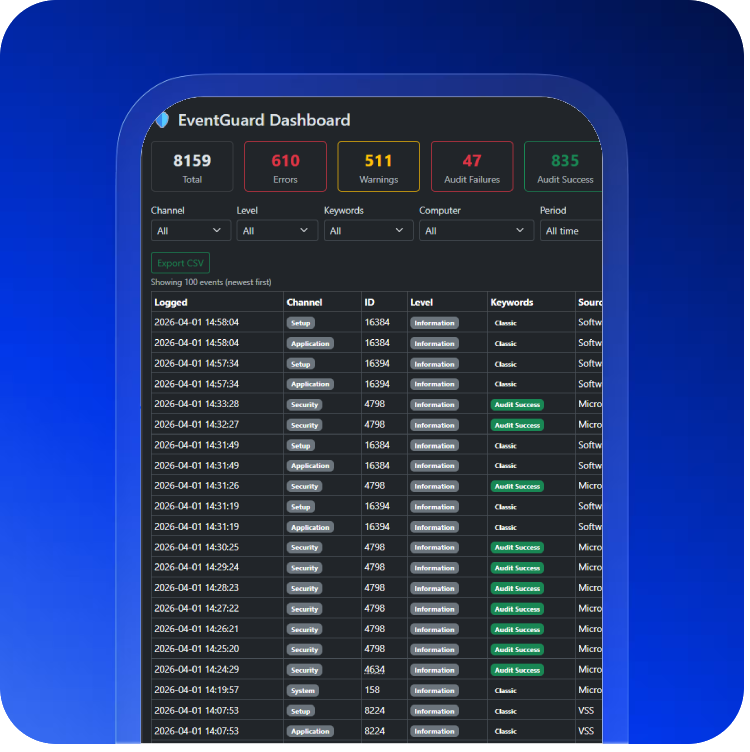
What is EventGuard? EventGuard is an intuitive and affordable Windows event log management tool that delivers exactly what enterprises look for: predictable pricing and fast search performance. The dashboard makes event data easily searchable through a secure webpage that features a single pane of glass, user friendly interface requiring no training. Our log collection agent has a very low memory footprint as it applies a multi tier filter logic to reduce event noise, so database storage needs will be much lower than those of our competitors. Security at every layer and retention is NIST compliant at 13 months by default. You can be up and running in just one hour.
Predictable Pricing
Fast Search Performance
EventGuard Product Capabilities at a Glance
• Unlimited agents
• Smart filtering to reduce database size
• Unlimited database size
• NIST compliant data retention (13 months default)
• Responsive searching with filtering
• Live tailing for monitoring
• Export CSV for reports
• TLS/SSL certificate on web dashboard
• API keys between Agent and Database
• DPAPI encryption at rest
• Security groups logins with AD option
• Agents deploy in minutes
• No Python prerequisite
• No cloud dependency
• No dedicated staff needed to run it
• No SaaS recurring fee
• No per Agent, Ingestion, Container, or GB fees
• An alternative to expensive SIEM bloatware
Enterprise Requirements — How EventGuard Answers
Centralized Log Collection and Aggregation
Requirement: Collect logs from all servers, applications, network devices, and cloud services in one place with lightweight agents that do not impact production performance.
✅ EventGuard solution: A lightweight Windows agent using just 11MB of RAM collects Event Logs, custom application logs, and security logs. The central collector aggregates everything into a single searchable dashboard with no complex configurations and no Python dependencies. View collection details →
Long Term Retention and Storage
Requirement: Retain logs for 1 to 7 plus years to meet compliance standards such as SOC2, HIPAA, PCI DSS, and SOX without paying exorbitant storage fees.
✅ EventGuard solution: EventGuard retains logs for 13 months by default to meet NIST 800-92 compliance. For longer retention periods beyond 13 months, the database can be backed up manually to preserve logs for extended compliance needs such as HIPAA (6 years) or SOX (7 years). This gives you flexibility without forcing you to pay for storage you may not need. Learn about retention options →
Security Monitoring and Visibility
Requirement: Real time visibility into security events, anomalies, and policy violations with the ability to monitor and investigate suspicious activity.
✅ EventGuard solution: Live tailing monitoring for SOC teams with customizable filters. The dashboard refreshes every 60 seconds, giving you near real time visibility into your Windows event logs. Set up filtered views to monitor specific security events, failed logins, or configuration changes as they happen. See live tailing in action →
Alerting and Intrusion Detection
Requirement: Automated alerting on security events and intrusion detection capabilities to identify threats in real time.
ℹ️ EventGuard approach: EventGuard focuses on log management and security monitoring rather than automated alerting or intrusion detection. Instead of noisy alerts that can lead to false positive fatigue, EventGuard provides live tailing monitoring for SOC teams with powerful filters and a 60 second refresh of event logs. Analysts can watch security events as they happen, apply filters to focus on what matters, and investigate incidents immediately. Learn about monitoring approach →
Security and Compliance Features
Requirement: Tamper proof audit trails, encryption in transit and at rest, Active Directory integration for secure access, and pre built compliance reports.
✅ EventGuard solution: Cryptographic sealing using hash chaining to prevent log tampering, HTTPS and TLS 1.3 encryption, DPAPI plus AES-256 at rest, and Active Directory integration for secure authentication. Pre built compliance reports are available as CSV exports for SOC2, HIPAA, PCI DSS, and NIST 800-92. Review security documentation →
Customizable Dashboards and Visualization
Requirement: Drill down from graphs to raw logs, customizable dashboards for different teams including Security, IT Ops, and Compliance, with no complex query languages required.
✅ EventGuard solution: Fully customizable dashboards that let you visualize log trends, security events, and system health. Click any chart to drill directly into the underlying logs. Create separate dashboards for Security, IT Operations, and Compliance teams all without writing a single line of code. Explore dashboard examples →
Scalability and Performance
Requirement: Handling hundreds of terabytes or petabytes of log data with linear performance scaling and no degradation during peak ingestion periods.
✅ EventGuard solution: Scales with your business. Add as many agents as you need because there is no per agent fee. The indexed database architecture ensures consistent query performance even as log volume grows. Whether you ingest 100 GB per day or 10 TB per day, EventGuard handles it. And because it is on premises, you control the hardware. Read about unlimited scaling →
Integration Capabilities
Requirement: API access for automation and custom tooling, pre built integrations with SIEMs and ticketing systems, and webhook support for custom workflows.
✅ EventGuard solution: A full REST API with unlimited calls and no per API fees. Integrate with your existing SIEM, ticketing system, or SOAR platform. Send data via webhooks to any destination. View API documentation →
User Management and Access Control
Requirement: Secure authentication, Active Directory integration, and the ability to control who can access log data.
✅ EventGuard solution: Active Directory integration for seamless and secure authentication. Security groups control login access, allowing you to manage who can view and search logs. This integrates directly with your existing security infrastructure without creating separate user management overhead. Learn about access control →
Operational Simplicity
Requirement: Deployment in hours not months, no dedicated SIEM experts required to operate, and minimal maintenance and administrative overhead.
✅ EventGuard solution: Deploys in under one hour. No Python, no Elasticsearch clusters to manage, no DevOps team required. One IT generalist can manage the entire platform. Updates are simple, maintenance is minimal, and there is no SIEM guru tax. Start your trial today →
High Availability and Disaster Recovery
Requirement: Redundant deployment options, automated failover, backup, and on premises, cloud, or hybrid deployment flexibility.
✅ EventGuard solution: Supports active passive and active active high availability configurations. Deploy on premises for air gapped security, in your private cloud, or as a hybrid solution. Automated backups and disaster recovery procedures are built in. You control your data. Explore deployment options →
Documentation and Self Service
Requirement: Clear documentation to troubleshoot deployment issues when infrastructure changes occur.
✅ EventGuard solution: EventGuard has no bugs and requires no patching because we have tombstoned features to avoid bloatware and price increases. However, changes in your IT infrastructure may break the architecture EventGuard runs on in your environment. That is why we offer simple, comprehensive documentation to help you troubleshoot your EventGuard deployment. Visit our FAQ page →
EventGuard vs All Log Tools
| Requirement | All Log Tools | EventGuard |
|---|---|---|
| Pricing model | Per TB plus per user plus hidden fees | ✅ Low flat rate license, $0 TCO |
| Data volume limits | ❌ Overage charges | ✅ Unlimited data |
| User licensing | ❌ $50 to $150 per user per month | ✅ No per user fees |
| API calls | ❌ Per million requests | ✅ Free unlimited API calls |
| Egress fees | ❌ $0.09 to $0.50 per GB | ✅ No egress fees |
| Deployment time | Weeks to months | ✅ Under 1 hour |
| Requires SIEM expert | ❌ Yes | ✅ No, IT generalist can manage |
| Tamper proof audit trails | ✅ Some vendors | ✅ Included |
| Compliance reports | ✅ Often extra cost | ✅ CSV export |
| Bugs and patching | ❌ Frequent CVEs and patches | ✅ No bugs, no patching needed |
| Price increases over time | ❌ Annual increases | ✅ Tombstoned features, no bloatware |
| Retention | ❌ Limited retention or extra cost | ✅ 13 months NIST default, manual backup for longer retention |
People Also Ask About Log Management
Ready to see EventGuard in action?
Stop paying hidden fees. Stop wrestling with complex SIEMs. Start managing Windows logs the right way.
📚 Learn more about EventGuard:
Product features | Pricing plans | Security & compliance | Competitor comparisons | Knowledge base | Latest articles | Our team